In the beginning of 2019 I had finished the OpenRISC GCC port
and was working on building up toolchain test and verification support using the
mor1kx soft core. Part of the mor1kx’s
feature set is the ability to swap out different pipeline arrangements to
configure the CPU for performance or resource usage. Each pipeline is named
after an Italian coffee, we have Cappuccino, Espresso and Pronto-Espresso. One
of these pipelines which has been under development but never integrated into
the main branch was the Marocchino. I had never paid much attention to the
Marocchino pipeline.
Around the same time the author of Marocchino sent a mail mentioning he could
not use the new GCC port as it was missing Single and Double precision FPU
support. Using the new verification pipeline I set out to start working on
adding single and double precision floating point support to the OpenRISC gcc
port. My verification target would be the Marocchino pipeline.
After some initial investigation I found this CPU was much more than a new pipeline
for the mor1kx with a special FPU. The marocchino has morphed into a complete re-implementation
of the OpenRISC 1000 spec. Seeing this we split
the marocchino out to it’s own repository
where it could grow on it’s own. Of course maintaining the Italian coffee name.
With features like out-of-order execution using
Tomasulo’s algorithm, 64-bit
FPU operations using register pairs, MMU, Instruction caches, Data caches,
Multicore support and a clean verilog code base the Marocchino is advanced to
say the least.
I would claim Marocchino is one of the most advanced implementations of a
out-of-order execution open source CPU cores. One of it’s friendly rivals is the
BOOM core a 64-bit risc-v
implementation written in Chisel. To contrast Marocchino has a similar feature
set but is 32-bit OpenRISC written in verilog making it approachable. If you
know more out-of-order execution open source cores I would love to know, and I
can update this list.
Let’s dive in.
Getting started with Marocchino
We can quickly get started with Marocchino as we use
FuseSoC. Which makes bringing together an
running verilog libraries, or cores, a snap.
Environment Setup
The Marocchino development environment requires Linux, you can use a VM, docker
or your own machine. I personally use fedora and maintain several Debian docker
images for continuous integration and package builds.
The environment we install allows for simulating verilog using
icarus or
verilator. It also allows synthesis
and programming to an FPGA using EDA tools. Here we will cover only simulation.
For details on programming an SoC to an FPGA using FuseSoC see the build and
pgm commands in FuseSoC documentation.
Note Below we use /tmp/openrisc to install software and work on code, but
you can use any path you like.
Setting up FuseSoC
To get started let’s setup FuseSoC and install the required cores into the
FuseSoC library.
Here we clone the git repositories used for Marocchino development into
/tmp/openrisc/src feel free to have a look, If you feel adventurous make some
changes. The repos include:
mor1kx-generic - the SoC
system configuration which wires together the CPU, Memory, System bus, UART
and a simple interrupt peripheral.
Next we will need to install our verilog compiler/simulator Icarus Verilog (iverilog).
mkdir -p /tmp/openrisc/iverilog
cd /tmp/openrisc/iverilog
git clone https://github.com/steveicarus/iverilog.git .

sh autoconf.sh
./configure --prefix=/tmp/openrisc/local
make
make install
export PATH=/tmp/openrisc/local/bin:$PATH
Using Docker
Update 2021: The docker images are out of date and no longer work well, please use the manual
setup method.
If you want to get started very quickly faster we can use the
librecores-ci
docker image. Which includes iverilog, verilator and fusesoc.
This allows us to skip the Setting up Icarus Verilog and part of the Setting
up FuseSoC step above.
This can be done with the following.
docker pull librecores/librecores-ci
docker run -it --rm docker.io/librecores/librecores-ci
Setting up GCC
Next we install the GCC toolchain which is used for compiling C and OpenRISC
assembly programs. The produced elf binaries can be loaded and run on the CPU core.
Pull the latest toolchain from my gcc
releases page. Here we use the
newlib (baremetal) toolchain which allows
compiling programs which run directly on the processor. For details on other
toolchains available see the toolchain summary
on the OpenRISC homepage.
mkdir -p /tmp/openrisc
cd /tmp/openrisc
wget https://github.com/stffrdhrn/gcc/releases/download/or1k-9.1.1-20190507/or1k-elf-9.1.1-20190507.tar.xz

tar -xf or1k-elf-9.1.1-20190507.tar.xz
export PATH=/tmp/openrisc/or1k-elf/bin:$PATH
The development environment should now be set up.
To check everything works you should be able to run the following commands.
Setup Verification
To ensure the toolchain is installed and working we can run the following:
$ or1k-elf-gcc --version
or1k-elf-gcc (GCC) 9.1.1 20190503
Copyright (C) 2019 Free Software Foundation, Inc.
This is free software; see the source for copying conditions.  There is NO
warranty; not even for MERCHANTABILITY or FITNESS FOR A PARTICULAR PURPOSE.
To ensure FuseSoC and the required cores are installed we can run this:
$ fusesoc core-info mor1kx-generic
CORE INFO
Name:      ::mor1kx-generic:1.1
Core root: /root/.local/share/fusesoc/mor1kx-generic

Targets:
marocchino_tb
mor1kx_tb

$ fusesoc list-cores
...
::intgen:0                     : local
::or1k_marocchino:5.0-r3       : local
...
Running an Assembly Program
The most simple program you can run on OpenRISC is a simple assembly program.
When running, everything in the below program is loaded into the OpenRISC
memory, nothing more nothing less.
To compile, run and trace a simple assembly program we do the following.
To compile this we use or1k-elf-gcc. Note the -nostartfiles option, this is
useful for compiling assembly when we don’t need
newlib/libgloss
provided “startup” sections linked into the binary as we provide them ourselves.
mkdir /tmp/openrisc/src
cd /tmp/openrisc/src
vim openrisc-asm.s

or1k-elf-gcc -nostartfiles openrisc-asm.s -o openrisc-asm
Finally, to run the program on the Marocchino we run fusesoc with the below
options.
run - specifies that we want to run a simulation.
--target - is a FuseSoC option for run specifying which of the
mor1kx-generic targets we want to run, here we specify marochino_tb, the
Marocchino test bench.
--tool - is a sub option for --target specifying that we want to run the
marocchino_tb target using icarus.
::mor1kx-generic:1.1 - specifies which system we want to run. System’s
represent an SoC that can be simulated or synthesized. You can see a list of
system using list-cores.
--elf_load - is mor1kx-generic specific option which specifies an elf
binary that will be loaded into memory before the simulation starts.
--trace_enable - is a mor1kx-generic specific option enabling tracing.
When specified the simulator will output a trace file to {fusesoc-builds}/mor1kx-generic_1.1/marocchino_tb-icarus/marocchino-trace.logsee log.
--trace_to_screen - is a mor1kx-generic specific option enabling tracing
instruction execution to the console as we can see below.
--vcd - is a mor1kx-generic option instruction icarus to output a vcd
file which creates a trace file which can be loaded with gtkwave.
fusesoc run --target marocchino_tb --tool icarus ::mor1kx-generic:1.1 \
  --elf_load ./openrisc-asm --trace_enable --trace_to_screen --vcd

VCD info: dumpfile testlog.vcd opened for output.
Program header 0: addr 0x00000000, size 0x000001A0
elf-loader: /tmp/openrisc/src/openrisc-asm was loaded
Loading         104 words
                   0 : Illegal Wishbone B3 cycle type (xxx)
S 00000100: 18800000 l.movhi r4,0x0000       r4         = 00000000  flag: 0
S 00000104: a8840110 l.ori   r4,r4,0x0110    r4         = 00000110  flag: 0
S 00000108: 44002000 l.jr    r4                                     flag: 0
S 0000010c: 15000000 l.nop   0x0000                                 flag: 0
S 00000110: 9c200001 l.addi  r1,r0,0x0001    r1         = 00000001  flag: 0
S 00000114: 9c410002 l.addi  r2,r1,0x0002    r2         = 00000003  flag: 0
S 00000118: 9c620004 l.addi  r3,r2,0x0004    r3         = 00000007  flag: 0
S 0000011c: 9c830008 l.addi  r4,r3,0x0008    r4         = 0000000f  flag: 0
S 00000120: 9ca40010 l.addi  r5,r4,0x0010    r5         = 0000001f  flag: 0
S 00000124: 9cc50020 l.addi  r6,r5,0x0020    r6         = 0000003f  flag: 0
S 00000128: 9ce60040 l.addi  r7,r6,0x0040    r7         = 0000007f  flag: 0
S 0000012c: 9d070080 l.addi  r8,r7,0x0080    r8         = 000000ff  flag: 0
S 00000130: 9d280100 l.addi  r9,r8,0x0100    r9         = 000001ff  flag: 0
S 00000134: 9d490200 l.addi  r10,r9,0x0200   r10        = 000003ff  flag: 0
S 00000138: 9d6a0400 l.addi  r11,r10,0x0400  r11        = 000007ff  flag: 0
S 0000013c: 9d8b0800 l.addi  r12,r11,0x0800  r12        = 00000fff  flag: 0
S 00000140: 9dac1000 l.addi  r13,r12,0x1000  r13        = 00001fff  flag: 0
S 00000144: 9dcd2000 l.addi  r14,r13,0x2000  r14        = 00003fff  flag: 0
S 00000148: 9dee4000 l.addi  r15,r14,0x4000  r15        = 00007fff  flag: 0
S 0000014c: 9e0f8000 l.addi  r16,r15,0x8000  r16        = ffffffff  flag: 0
S 00000150: e3e00802 l.sub   r31,r0,r1       r31        = ffffffff  flag: 0
S 00000154: e3df1002 l.sub   r30,r31,r2      r30        = fffffffc  flag: 0
S 00000158: e3be1802 l.sub   r29,r30,r3      r29        = fffffff5  flag: 0
S 0000015c: e39d2002 l.sub   r28,r29,r4      r28        = ffffffe6  flag: 0
S 00000160: e37c2802 l.sub   r27,r28,r5      r27        = ffffffc7  flag: 0
S 00000164: e35b3002 l.sub   r26,r27,r6      r26        = ffffff88  flag: 0
S 00000168: e33a3802 l.sub   r25,r26,r7      r25        = ffffff09  flag: 0
S 0000016c: e3194002 l.sub   r24,r25,r8      r24        = fffffe0a  flag: 0
S 00000170: e2f84802 l.sub   r23,r24,r9      r23        = fffffc0b  flag: 0
S 00000174: e2d75002 l.sub   r22,r23,r10     r22        = fffff80c  flag: 0
S 00000178: e2b65802 l.sub   r21,r22,r11     r21        = fffff00d  flag: 0
S 0000017c: e2956002 l.sub   r20,r21,r12     r20        = ffffe00e  flag: 0
S 00000180: e2746802 l.sub   r19,r20,r13     r19        = ffffc00f  flag: 0
S 00000184: e2537002 l.sub   r18,r19,r14     r18        = ffff8010  flag: 0
S 00000188: e2327802 l.sub   r17,r18,r15     r17        = ffff0011  flag: 0
S 0000018c: e2118002 l.sub   r16,r17,r16     r16        = ffff0012  flag: 0
S 00000190: 18600000 l.movhi r3,0x0000       r3         = 00000000  flag: 0
S 00000194: 15000001 l.nop   0x0001                                 flag: 0
exit(0x00000000);
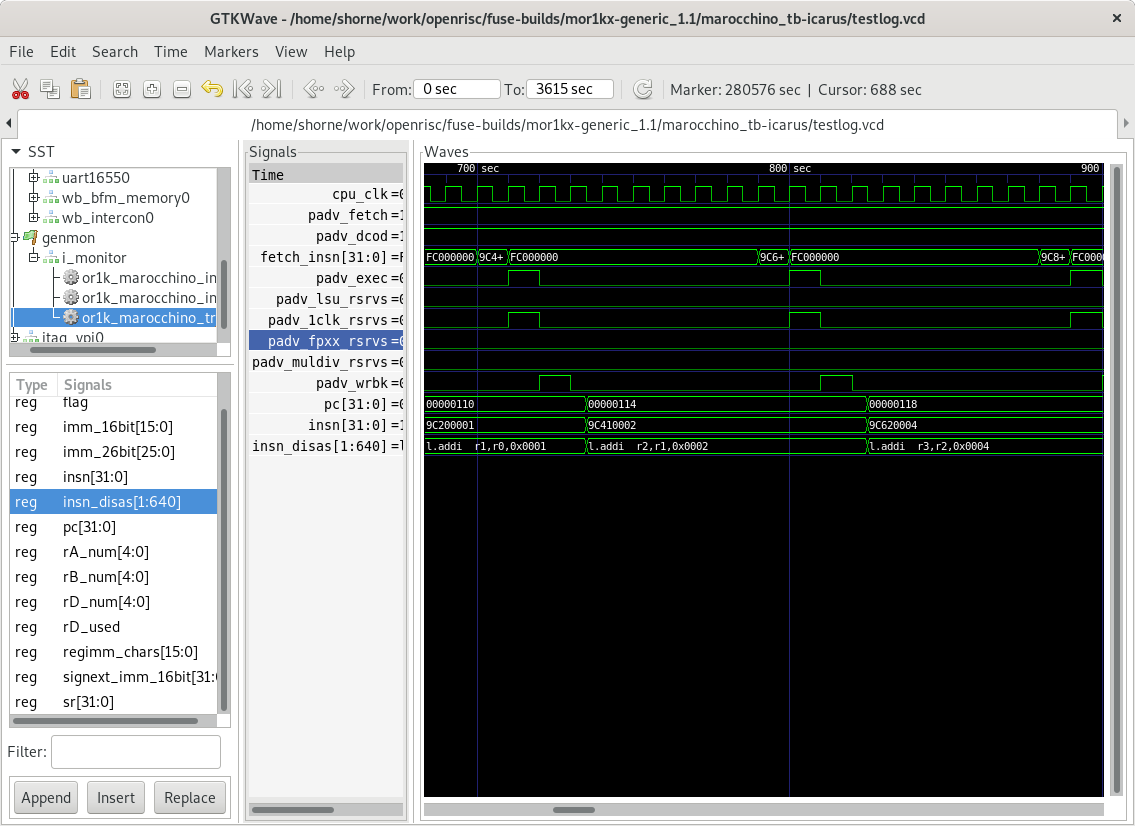
If we look at the VCD trace file in gtkwave we
can see the below trace. The trace file is also helpful for navigating through
the various SoC components as it captures all wire transitions.
Take note that we are not seeing very good performance, this is because caching is
not enabled and the CPU takes several cycles to read an instruction from memory.
This means we are not seeing one instruction executed per cycle. Enabling
caches would fix this.
Running a C program
When we compile a C program there is a lot more happening behind the scenes.
The linker will link in an entire runtime that along with standard libc
functions on OpenRISC will setup interrupt vectors, enable caches, setup memory
sections for variables, run static initializers and finally run our program.
The program:
/* Simple c program, doing some math.  */

#include <stdio.h>

int a [] = { 1, 2, 3, 4, 5 };

int madd(int a, int b, int c) {
  return a * b + c;
}

int main() {
  int res;

  for (int i = 0; i < 5; i++) {
    res = madd(0  , a[1], a[i]);
    res = madd(res, a[2], a[i]);
    res = madd(res, a[2], a[i]);
    res = madd(res, a[3], a[i]);
    res = madd(res, a[4], a[i]);
  }

  printf("Result is = %d\n", res);

  return 0;
}
To compile we use the below or1k-elf-gcc command. Notice, we do not specify
-nostartfiles here as we do want newlib to link in all the start routines to
provide a full c runtime. We do specify the following arguments to tell GCC a
bit about our OpenRISC cpu. If these -m options are not specified GCC will
link in code using the libgcc library to emulate these instructions.
-mhard-mul - indicates that our cpu target supports multiply instructions.
-mhard-div - indicates that our cpu target supports divide instructions.
-mhard-float - indicates that our cpu target supports FPU instructions.
-mdouble-float - indicates that our cpu target supports the new double precision floating point instructions using register pairs (orfpx64a32).
To see a full list of options for OpenRISC read the GCC manual or see the output
of or1k-elf-gcc --target-help.
If we want to inspect the assembly to ensure we did generate multiply instructions
we can use the trusty objdump utility. As per below, yes, we can see multiply
instructions.
Similar to running the assembly example we can run this with fusesoc as follows.
fusesoc run --target marocchino_tb --tool icarus ::mor1kx-generic:1.1 \
  --elf_load ./openrisc-c --trace_enable --vcd
...

Result is = 1330
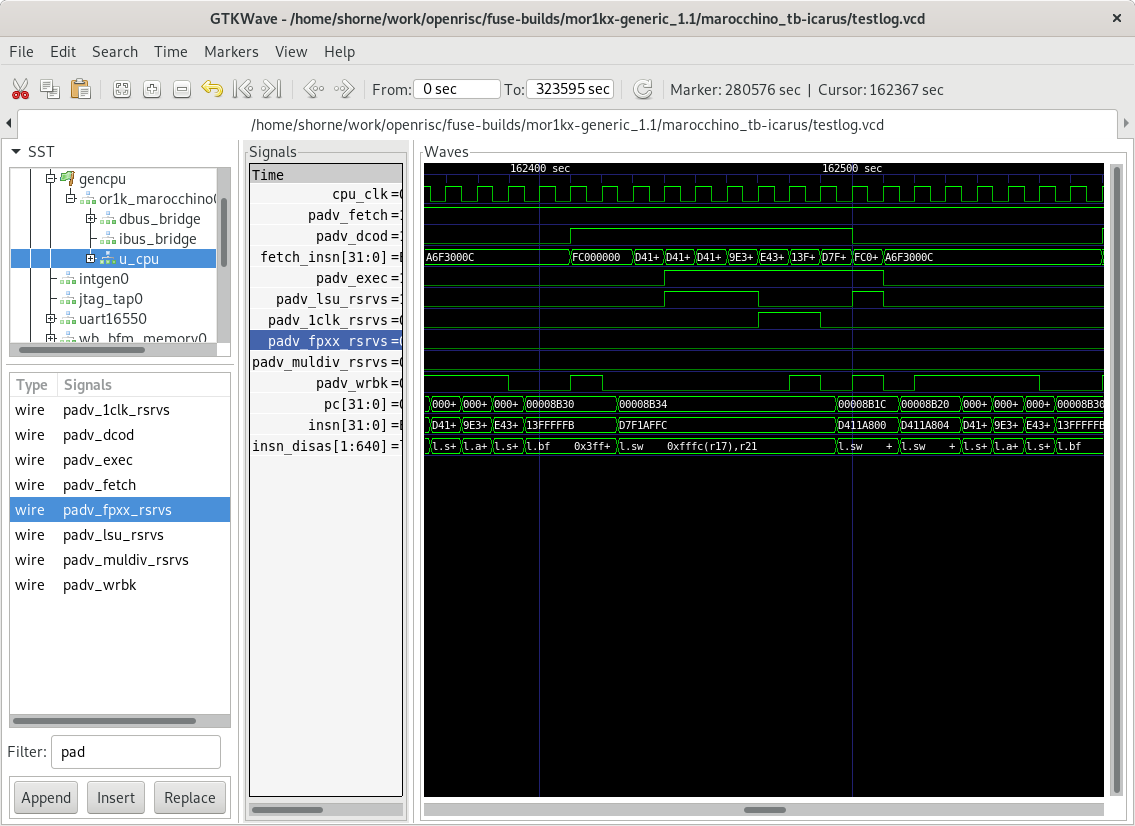
Now, if we look at the VCD trace file we can see the
below trace. Notice that with the c program we can observe better pipelining where
an instruction can be executed every clock cycle. This is because caches have
been initialized as part of the newlib c-runtime initialization, great!
Conclusion
In this article we went through a quick introduction to the Marocchino
development environment. The development environment would actually be similar
when developing any OpenRISC core.
This environment will allow the reader to following in future Marocchino
articles where we go deeper into the architecture. In this environment you can
now:
Develop and test verilog code for the Marocchino processor
Develop assembly programs and test them on the Marocchino or other OpenRISC processors
Develop c programs and test them on the Marocchino or other OpenRISC processors
In the next article we will look more into how the above programs actually flow
through the Marocchino pipeline. Stay tuned.
What I learned from doing the OpenRISC GCC port, defining the stack frame
This is a continuation on my notes of things I learned while working on the
OpenRISC GCC backend port. The stack frame layout is very important to get
right when implementing an architecture’s calling conventions.
If not we may have a compiler that works fine with code it compiles but cannot
interoperate with libraries produced by another compiler.
For me I figured this would be most difficult as I am horrible with off by
one bugs. However, after
learning the whole picture I was able to get it working.
In this post we will go over the two main stack frame concepts:
Registers - The GCC internal and hard register numbers pointing into the stack
Stack Layout - How memory layout of the stack is defined
Registers
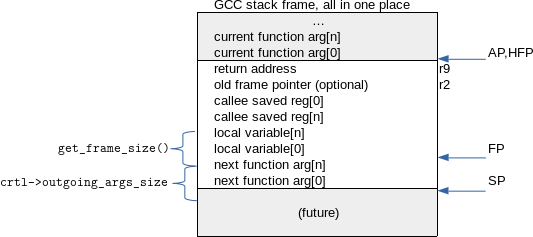
Stack registers are cpu registers dedicated to point to different locations in
the stack. The content of these registers is updated during function epilogue
and prologue. In the above diagram we can see the pointed out as AP, HFP,
FP and SP.
Virtual Registers
GCC’s first glimpse of the stack.
These are created during the expand and eliminated during vreg pass.
By looking at these we cat understand the whole picture: Offsets, outgoing
arguments, incoming arguments etc.
The virtual registers are GCC’s canonical view of the stack frame. During the vregs
pass they will be replaced with architecture specific registers. See details on
this in my discussion on GCC important passes.
Macro
GCC
OpenRISC
VIRTUAL_INCOMING_ARGS_REGNUM
Points to incoming arguments. ARG_POINTER_REGNUM + FIRST_PARM_OFFSET.
default
VIRTUAL_STACK_VARS_REGNUM
Points to local variables. FRAME_POINTER_REGNUM + TARGET_STARTING_FRAME_OFFSET.
default
VIRTUAL_STACK_DYNAMIC_REGNUM
STACK_POINTER_REGNUM + STACK_DYNAMIC_OFFSET.
default
VIRTUAL_OUTGOING_ARGS_REGNUM
Points to outgoing arguments. STACK_POINTER_REGNUM + STACK_POINTER_OFFSET.
default
Real Registers (Sometimes)
The stack pointer will pretty much always be a real register that shows up in the final
assembly. Other registers will be like virtuals and eliminated during some pass.
Macro
GCC
OpenRISC
STACK_POINTER_REGNUM
The hard stack pointer register, not defined where it should point
Points to the last data on the current stack frame. i.e. 0(r1) points next function arg[0]
FRAME_POINTER_REGNUM (FP)
Points to automatic/local variable storage
Points to the first local variable. i.e. 0(FP) points to local variable[0].
HARD_FRAME_POINTER_REGNUM
The hard frame pointer, not defined where it should point
Points to the same location as the previous functions SP. i.e. 0(r2) points to current function arg[0]
ARG_POINTER_REGNUM
Points to current function incoming arguments
For OpenRISC this is the same as HARD_FRAME_POINTER_REGNUM.
Stack Layout
Stack layout defines how the stack frame is placed in memory.
Eliminations
Eliminations provide the rules for which registers can be eliminated by
replacing them with another register and a calculated offset. The offset is
calculated by looking at data collected by the TARGET_COMPUTE_FRAME_LAYOUT
macro function.
On OpenRISC we have defined these below. We allow the frame pointer and
argument pointer to be eliminated. They will be replaced with either the stack
pointer register or the hard frame pointer. In OpenRISC there is no argument
pointer so it will always need to be eliminated. Also, the frame pointer is a
placeholder, when elimination is done it will be eliminated.
Note GCC knows that at some optimization levels the hard frame pointer will be
omitted. In these cases HARD_FRAME_POINTER_REGNUM will not selected as the
elimination target register. We don’t need to define any hard frame pointer
eliminations.
Macro
GCC
OpenRISC
ELIMINABLE_REGS
Sets of registers from, to which we can eliminate by calculating the difference between them.
We eliminate Argument Pointer and Frame Pointer.
INITIAL_ELIMINATION_OFFSET
Function to compute the difference between eliminable registers.
HOST_WIDE_INTor1k_initial_elimination_offset(intfrom,intto){HOST_WIDE_INToffset;/* Set OFFSET to the offset from the stack pointer. */switch(from){/* Incoming args are all the way up at the previous frame. */caseARG_POINTER_REGNUM:offset=cfun->machine->total_size;break;/* Local args grow downward from the saved registers. */caseFRAME_POINTER_REGNUM:offset=cfun->machine->args_size+cfun->machine->local_vars_size;break;default:gcc_unreachable();}if(to==HARD_FRAME_POINTER_REGNUM)offset-=cfun->machine->total_size;returnoffset;}
Stack Section Growth
Some sections of the stack frame may contain multiple variables, for example we
may have multiple outgoing arguments or local variables. The order in which
these are stored in memory is defined by these macros.
Note On OpenRISC the local variables definition changed during implementation
from upwards to downwards. These are local only to the current function so does
not impact calling conventions.
For a new port is recommended to define FRAME_GROWS_DOWNWARD as 1 as it is
usually not critical to the target calling conventions and defining it also
enables the Stack Protector
feature. The stack protector can be turned on in gcc using -fstack-protector,
during build ensure to --enable-libssp which is enabled by default.
Macro
GCC
OpenRISC
STACK_GROWS_DOWNWARD
Define true if new stack frames decrease towards memory address 0x0.
1
FRAME_GROWS_DOWNWARD
Define true if increasing local variables are at negative offset from FP. Define this to enable the GCC stack protector feature.
1
ARGS_GROW_DOWNWARD
Define true if increasing function arguments are at negative offset from AP for incoming args and SP for outgoing args.
0 (default)
Stack Section Offsets
Offsets may be required if an architecture has extra offsets between the
different register pointers and the actual variable data. In OpenRISC we have
no such offsets.
Macro
GCC
OpenRISC
STACK_POINTER_OFFSET
See VIRTUAL_OUTGOING_ARGS_REGNUM
0
FIRST_PARM_OFFSET
See VIRTUAL_INCOMING_ARGS_REGNUM
0
STACK_DYNAMIC_OFFSET
See VIRTUAL_STACK_DYNAMIC_REGNUM
0
TARGET_STARTING_FRAME_OFFSET
See VIRTUAL_OUTGOING_ARGS_REGNUM
0
Outgoing Arguments
When a function calls another function sometimes the arguments to that function
will need to be stored to the stack before making the function call. For
OpenRISC this is when we have more arguments than fit in argument registers or
when we have variadic arguments. The outgoing
arguments for all child functions need to be accounted for and the space will be
allocated on the stack.
On some architectures outgoing arguments are pushed onto and popped off the
stack. For OpenRISC we do not do this we simply, allocate the required memory in
the prologue.
Macro
GCC
OpenRISC
ACCUMULATE_OUTGOING_ARGS
If defined, don’t push args just store in crtl->outgoing_args_size. Our prologue should allocate this space relative to the SP (as per ARGS_GROW_DOWNWARD).
1
CUMULATIVE_ARGS
A C type used for tracking args in the TARGET_FUNCTION_ARG_* macros.
int
INIT_CUMULATIVE_ARGS
Initializes a newly created CUMULALTIVE_ARGS type.
Sets the int variable to 0
TARGET_FUNCTION_ARG
Return a reg RTX or Zero to indicate when to start to pass outgoing args on the stack.
See implementation
FUNCTION_ARG_REGNO_P
Returns true of the given register number is used for passing outgoing function arguments.
r3 to r8 are OK for arguments
TARGET_FUNCTION_ARG_ADVANCE
This is called during iterating through outgoing function args to account for the next function arg size.
See implementation
Further Reading
These references were very helpful in getting our calling conventions right:
I realized early on that trouble shooting issues requires understanding the purpose
of some important compiler passes. It was difficult to understand what
all of the compiler passes were. There are so many, 200+, but after some time I found
there are a few key passes to be concerned about; lets jump in.
Quick Tips
When debugging compiler problems use the -fdump-rtl-all-all and
-fdump-tree-all-all flags to debug where things go wrong.
To understand which passes are run for different -On optimization levels
you can use -fdump-passes.
The numbers in the dump output files indicate the order in which passes were run. For
example between test.c.235r.vregs and test.c.234r.expand the expand pass is run
before vregs, and there were no passes run inbetween.
The debug options-S -dp are also helpful for tying RTL up with the output assembly.
The -S option tells the compiler to dump the assembler output, and -dp
enables annotation comments showing the RTL instruction id, name and other useful
statistics.
Glossary Terms
We may see cfg thoughout the gcc source, this is not configuration, but
control flow graph.
Spilling is performed when there are not enough registers available during register
allocation to store all scope variables, one variable in a register is chosen
and spilled by saving it to memory; thus freeing up a register for allocation.
IL is a GCC intermediate language i.e. GIMPLE or RTL. During porting we are
mainly concerned with RTL.
Lowering are operations done by passes to take higher level language
and graph representations and make them more simple/lower level in preparation
for machine assembly conversion.
Predicates part of the RTL these are used to facilitate instruction
matching the. Having these more specific reduces the work that reload needs to
do and generates better code.
Constraints part of the RTL and used during reload, these are associated
with assembly instructions used to resolved the target instruction.
Passes
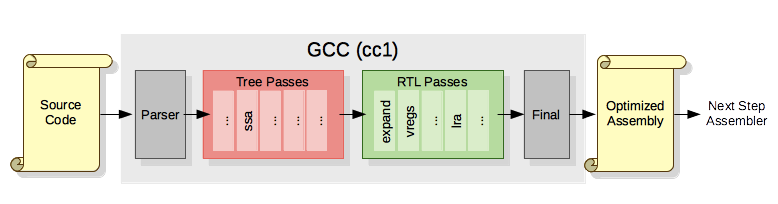
Passes are the core of the compiler. To start, there are basically two types of
compiler passes in gcc:
Tree - Passes working on GIMPLE.
RTL - Passes working on Register Transfer Language.
The expand pass is defined in gcc/cfgexpand.c.
It will take the instruction names like addsi3 and movsi and expand them to
RTL instructions which will be refined by further passes.
Expand Input
Before RTL generation we have GIMPLE. Below is the content of func.c.232t.optimized the last
of the tree passes before RTL conversion.
An important tree pass is Static Single Assignment
(SSA) I don’t go into it here, but it is what makes us have so many variables, note that
each variable will be assigned only once, this helps simplify the tree for analysis
and later RTL steps like register allocation.
After expand we can first see the RTL. Each statement of the gimple above will
be represented by 1 or more RTL expressions. I have simplified the RTL a bit and
included the GIMPLE inline for clarity.
Tip Reading RTL. RTL is a lisp dialect. Each statement has the form (type id prev next n (statement)).
(set (reg/v:SI 44) (reg:SI 3 r3)) (nil) - is the expression
Back to our example, this is with -O0 to allow the virtual-stack-vars to not
be elimated for verbosity:
This is the contents of func.c.234r.expand.
;; func (intD.1 aD.1448, intD.1 bD.1449);; {;; Note: First we save the arguments;; intD.1 a_2(D) = aD.1448;(insn2532(set(mem/c:SI(reg/f:SI36virtual-stack-vars)[1a+0S4A32])(reg:SI3r3[a]))"../func.c":1-1(nil));; intD.1 b_3(D) = bD.1449;(insn3242(set(mem/c:SI(plus:SI(reg/f:SI36virtual-stack-vars)(const_int4[0x4]))[1b+0S4A32])(reg:SI4r4[b]))"../func.c":1-1(nil));; Note: this was optimized from x 2 to n + n.;; _1 = a_2(D) * 2;;; This is expanded to:;; 1. Load a_2(D);; 2. Add a_2(D) + a_2(D) store result to temporary;; 3. Store results to _1(insn7482(set(reg:SI45)(mem/c:SI(reg/f:SI36virtual-stack-vars)[1a+0S4A32]))"../func.c":2-1(nil))(insn8792(set(reg:SI46)(plus:SI(reg:SI45)(reg:SI45)))"../func.c":2-1(nil))(insn98102(set(reg:SI42[_1])(reg:SI46))"../func.c":2-1(nil))a;; _4 = _1 + b_3(D);;; This is expanded to:;; 1. Load b_3(D);; 2. Do the Add and store to _4(insn109112(set(reg:SI47)(mem/c:SI(plus:SI(reg/f:SI36virtual-stack-vars)(const_int4[0x4]))[1b+0S4A32]))"../func.c":2-1(nil))(insn1110142(set(reg:SI43[_4])(plus:SI(reg:SI42[_1])(reg:SI47)))"../func.c":2-1(nil));; return _4;;; We put _4 into r11 the openrisc return value register(insn1411182(set(reg:SI44[<retval>])(reg:SI43[_4]))"../func.c":2-1(nil))(insn1814192(set(reg/i:SI11r11)(reg:SI44[<retval>]))"../func.c":3-1(nil))(insn191802(use(reg/i:SI11r11))"../func.c":3-1(nil))
The Virtual Register Pass
The virtual register pass is part of gcc/function.c file which has a few different
passes in it.
Here we can see that the previously seen variables stored to the frame at
virtual-stack-vars memory locations are now being stored to memory offsets of
an architecture specifc register. After the Virtual Registers pass all of the
virtual-* registers will be eliminated.
For OpenRISC we see ?fp, a fake register which we defined with macro
FRAME_POINTER_REGNUM. We use this as a placeholder as OpenRISC’s frame
pointer does not point to stack variables (it points to the function incoming
arguments). The placeholder is needed by GCC but it will be eliminated later.
On some arechitecture this will be a real register at this point.
;; Here we see virtual-stack-vars replaced with ?fp.(insn2532(set(mem/c:SI(reg/f:SI33?fp)[1a+0S4A32])(reg:SI3r3[a]))"../func.c":116{*movsi_internal}(nil))(insn3242(set(mem/c:SI(plus:SI(reg/f:SI33?fp)(const_int4[0x4]))[1b+0S4A32])(reg:SI4r4[b]))"../func.c":116{*movsi_internal}(nil))(insn7482(set(reg:SI45)(mem/c:SI(reg/f:SI33?fp)[1a+0S4A32]))"../func.c":216{*movsi_internal}(nil))(insn8792(set(reg:SI46)(plus:SI(reg:SI45)(reg:SI45)))"../func.c":22{addsi3}(nil))(insn98102(set(reg:SI42[_1])(reg:SI46))"../func.c":216{*movsi_internal}(nil))(insn109112(set(reg:SI47)(mem/c:SI(plus:SI(reg/f:SI33?fp)(const_int4[0x4]))[1b+0S4A32]))"../func.c":216{*movsi_internal}(nil));; ...
The Split and Combine Passes
The Split passes use define_split definitions to look for RTL expressions
which cannot be handled by a single instruction on the target architecture.
These instructions are split into multiple RTL instructions. Splits patterns
are defined in our machine description file.
The Combine pass does the opposite. It looks for instructions that can be combined
into a signle instruction. Having tightly defined predicates will ensure incorrect
combines don’t happen.
The combine pass code is about 15,000 lines of code.
14950 gcc/combine.c
The IRA Pass
The IRA and LRA passes are some of the most complicated passes, they are
responsible to turning the psuedo register allocations which have been used up
to this point and assigning real registers.
The Local Register
Allocator
pass replaced the reload pass which is still used by some targets. OpenRISC and
other modern ports use only LRA. The purpose of LRA/reload is to make sure each
RTL instruction has real registers and a real instruction to use for output. If
the criteria for an instruction is not met LRA/reload has some tricks to change
and instruction and “reload” it in order to get it to match the criteria.
During LRA/reload constraints are used to match the real target inscrutions, i.e.
"r" or "m" or target speciic ones like "O".
Before and after LRA/reload predicates are used to match RTL expressions, i.e
general_operand or target specific ones like reg_or_s16_operand.
If we look at a test.c.278r.reload dump file we will a few sections.
Local
Pseudo live ranges
Inheritance
Assignment
Repeat
********** Local #1: **********
...
            0 Non-pseudo reload: reject+=2
            0 Non input pseudo reload: reject++
            Cycle danger: overall += LRA_MAX_REJECT
          alt=0,overall=609,losers=1,rld_nregs=1
            0 Non-pseudo reload: reject+=2
            0 Non input pseudo reload: reject++
            alt=1: Bad operand -- refuse
            0 Non-pseudo reload: reject+=2
            0 Non input pseudo reload: reject++
            alt=2: Bad operand -- refuse
            0 Non-pseudo reload: reject+=2
            0 Non input pseudo reload: reject++
            alt=3: Bad operand -- refuse
          alt=4,overall=0,losers=0,rld_nregs=0
         Choosing alt 4 in insn 2:  (0) m  (1) rO {*movsi_internal}
...
The above snippet of the Local phase of the LRA/reload pass shows the contraints
matching loop for RTL insn 2.
To understand what is going on we should look at what is insn 2, from our
input. This is a set instruction having a destination of memory and a source
of register type, or "m,r".
We have walked some of the passes of GCC to better understand how it works.
During porting most of the problems will show up around expand, vregs and
reload passes. Its good to have a general idea of what these do and how
to read the dump files when troubleshooting. I hope the above helps.
News flash, the OpenRISC GCC port now can run “Hello World”
After about 4 months of development on the OpenRISC GCC port rewrite
I have hit my first major milestone, the “Hello World” program is working. Over those
4 months I spent about 2 months working on my from scratch dummy SMH port
then 2 months to get the OpenRISC port
to this stage.
Next Steps
There are still many todo items before this will be ready for general use, including:
Milestone 2 items
Investigate and Fix test suite failures, see below
Write OpenRISC specific test cases
Ensure all memory layout and calling conventions are within spec
Ensure sign extending, overflow, and carry flag arithmetic is correct
Fix issues with GDB debugging target remote is working OK, target sim is having issues.
Implement stubbed todo items, see below
Support for C++, I haven’t even tried to compile it yet
Milestone 3 items
Support for position independent code (PIC)
Support for thread local storage (TLS)
Support for floating point instructions (FPU)
Support for Atomic Builtins
Somewhere between milestone 2 and 3 I will start to work on getting the port
reviewed on the GCC and OpenRISC mailing lists. If anyone wants to review right
now please feel free to send feedback.
Test Suite Results
Running the gcc testsuite right now shows the following results. Many of these
look to be related to internal compiler errors.
                === gcc Summary ===

# of expected passes            84301
# of unexpected failures        5096
# of unexpected successes       3
# of expected failures          211
# of unresolved testcases       2821
# of unsupported tests          2630
/home/shorne/work/gnu-toolchain/build-gcc/gcc/xgcc  version 9.0.0 20180426 (experimental) (GCC)
Stubbed TODO Items
Some of the stubbed todo items include:
Trampoline Handling
In gcc/config/or1k/or1k.h implement trampoline hooks for nested functions.
In gcc/config/or1k/or1k.c ensure what I am doing is right, on other targets
they copy the address onto the stack before returning.
/* TODO, do we need to just set to r9? or should we put it to where r9
   is stored on the stack?  */
void
or1k_expand_eh_return (rtx eh_addr)
{
  emit_move_insn (gen_rtx_REG (Pmode, LR_REGNUM), eh_addr);
}
I am working on an OpenRISC GCC port rewrite, here’s why.
For the past few years I have been working as a contributor to the
OpenRISC CPU project. My work has mainly been focused on
developing interest in the project by keeping the toolchains and software
maintained and pushing outstanding patches upstream.
I have made way getting Linux SMP support,
the GDB port, QEMU fixes and other
patches written, reviewed and committed to the upstream repositories.
However there is one project that has been an issue from the beginning; GCC.
OpenRISC has a mature GCC port started in early 2000s.
The issue is it is not upstream due to one early contributor not having signed
over his copyright. I decided to start with the rewrite. To do this I will:
Write a SMH dummy
architecture port following the ggx porting guide (moxie) guide.
Use that basic knowledge to start on the or1k port.
If you are interested please reach out on IRC or E-mail.